Digital wedding RSVP: every reply in one place
Updated 1 October 2026 · by Ludvig Lindqvist Rovira, Lysela
With a digital RSVP, guests reply through a form on your wedding website instead of by text, email and phone. Every answer lands in the same list, with allergies and head counts, and you can see straight away which households have not replied. Here is how to set one up, what to write on the invitation and how to include the guests who would rather call.
Try it yourself, no account neededWhy a digital RSVP instead of texts and calls?
Replies that arrive in different ways have to be copied into a list by hand, and that is where things slip: a text that never got written down, an allergy mentioned in passing over dinner, a cousin who replied for the family and forgot the children. A form asks everyone the same questions and keeps the answers for you.
One reply per household
A guest answers for everyone who lives with them, so you are not piecing together three replies from the same address.
Allergies next to the name
Dietary needs come in with the reply, so you are not digging for a separate text when the caterer asks.
You can see who is missing
The list shows which households have replied, so the reminder only goes to those who have not.
No app to download
The form opens from a link or a QR code, on a phone or a computer, without an account.
Setting up a digital RSVP, step by step
| Step | What you do |
|---|---|
| 1. Pick the deadline | Four to six weeks before the wedding. Ask the venue or caterer when they need final numbers, and set the deadline a week before that. |
| 2. Choose the questions | Attending or not, the names of everyone coming, allergies and a message field go a long way. More questions are covered in the RSVP guide. |
| 3. Put the link on the invitation | Print the address and, ideally, a QR code. If your save the date used the same address, guests already know where to go. |
| 4. Follow the replies | You can start on the seating plan once most guests have replied. |
| 5. Remind those who are missing | A few days after the deadline, send a text to just those households. |
| 6. Send the list to the kitchen | Numbers and allergies, about three weeks before or whenever the caterer asks. |
What to write on the invitation
Three wordings to copy. Replace whatever is in square brackets. What else belongs on the invitation is covered in the wedding invitation guide.
Please reply by [date] at [address]. You can tell us about allergies and dietary needs there too.
Scan the code with your phone camera to reply, by [date]. One reply per household is enough.
Please reply by [date] at [address]. If you would rather call, ring [name] on [phone number].
How do you include guests who will not reply on a phone?
Put a phone number on the invitation so they know calling is fine. When grandma rings, fill in the form for her while you talk. Her reply then lands in the same list as everyone else's.
Plenty of older guests reply themselves once someone has shown them how. Ask a cousin or a grandchild to help at the next family dinner.
Digital RSVP or a printed reply card?
A printed reply card with a stamped envelope feels formal, but it costs postage, takes time to come back and still has to be typed into a list. A digital RSVP gives you the list straight away. Many couples print the invitation and take replies online, with the address or a QR code on the card. Guests get something for the fridge, and you have no reply cards to count.
Digital RSVP with Lysela
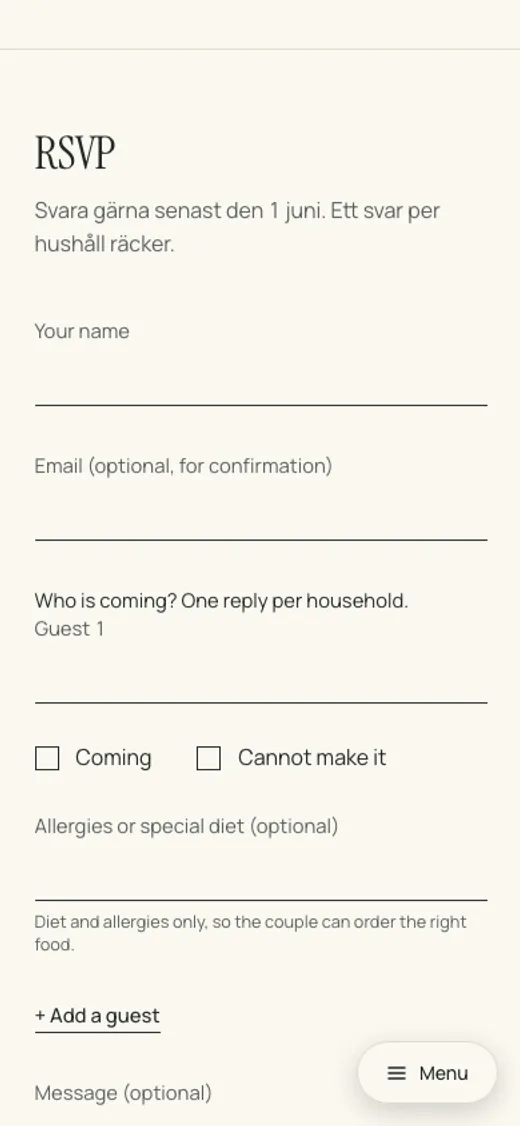
With Lysela, the RSVP lives on your wedding website. Guests reply on their phones, one reply per household, with no app or account, and allergies go in the same form. You see who is coming, the allergy list and coach seats in one place, and download the list for the kitchen. From Plus you can add a menu choice and questions of your own. With Premium each household gets its own link with their names already filled in, and is ticked off once they reply.
Common questions
Do guests need to download an app to reply?
No, not if the form is on an ordinary web page. Guests open the link or scan the QR code and reply in their browser.
When should the digital RSVP open?
When the invitation goes out, two to three months before the wedding, with the deadline four to six weeks before.
Is it rude to ask for replies online?
No, it is common now. Put a phone number on the invitation for anyone who would rather call, so nobody feels left out.
Can we see replies as they come in?
Yes. The list fills up as guests reply, so you can start planning tables and food before everyone has answered.